Monads in F#
An introduction to functional programming patterns using Monads in F# to handle side effects and compose operations elegantly.
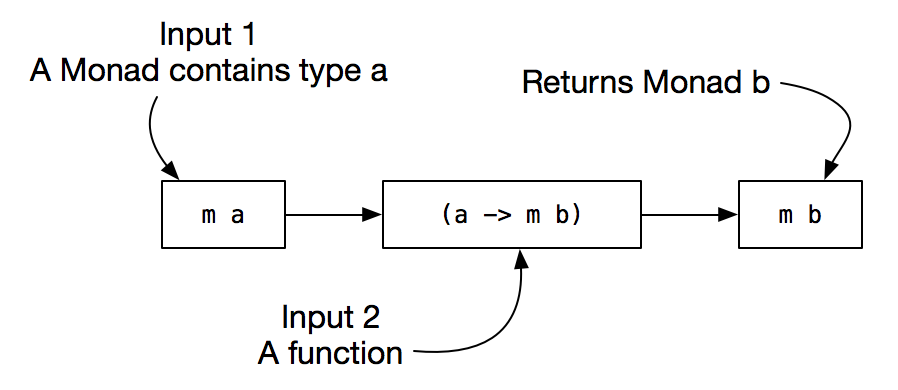
Understanding Monads in F#
Monads are a fundamental concept in functional programming that provide a powerful way to handle computations with additional context or effects. This post explores how F# implements various monads to make code cleaner, more maintainable, and more expressive.
The Core Concept: Extraction Notation
Before diving into specific monad types, let’s understand the fundamental notation we’ll use throughout:
1
let! a = x
When you see this expression, think of it as:
- x is a “box” containing some content
- a is the content we’re extracting from that box
- There’s additional processing happening in the background
This syntax performs two key operations:
- Extraction: Getting the value from a computational context
- Background handling: Managing side effects or special cases
The crucial insight is that we execute this extraction inside a specific environment (or monad type), which determines what background processing occurs.
Monad Types and Their Use Cases
1. Option Monad: Handling Missing Data
The Option type elegantly handles potentially missing values, replacing null checks with a composable pattern.
The Problem with Null:
1
2
3
4
5
6
// C# approach with null checks
if (x != null && y != null && z != null) {
    var result = x.Value + y.Value + z.Value;
    return result;
}
return null;
The F# Solution:
1
2
3
4
5
6
7
8
9
let opt = OptionBuilder()

let w =
    opt {
        let! a = x  // Extract from potentially empty x
        let! b = y  // Extract from potentially empty y
        let! c = z  // Extract from potentially empty z
        return a + b + c
    }
If any value is None, the entire computation short-circuits and returns None. No explicit null checking required!
Example Implementation:
1
2
3
4
5
6
7
8
9
10
11
12
type OptionBuilder() =
    member this.Bind(x, f) =
        Option.bind f x

    member this.Return x =
        Some x

let x = Some(1)
let y = None
let z = Some(3)

// Result: None (because y is None)
2. Result Monad: Managing Errors Gracefully
The Result type handles operations that can fail, eliminating the need for exception handling in many cases.
The Problem with Exceptions:
1
2
3
4
5
6
7
8
9
10
try {
    var a = Calculate1();  // Could throw
    var b = Calculate2();  // Could throw
    var c = Calculate3();  // Could throw
    return a + b + c;
} catch (Exception1 e) {
    // Handle exception1
} catch (Exception2 e) {
    // Handle exception2
}
The F# Solution:
1
2
3
4
5
6
7
8
9
let res = ResultBuilder()

let w =
    res {
        let! a = x  // Extract or propagate error
        let! b = y  // Extract or propagate error
        let! c = z  // Extract or propagate error
        return a + b + c
    }
When any computation returns an error, the entire chain stops and returns that error immediately.
Example:
1
2
3
4
5
6
let x = Result.Ok 1
let y = Result.Error "Division by zero"
let z = Result.Ok 3

// Result: Error "Division by zero"
// The computation stops at y and never evaluates z
3. List Monad: Cartesian Product Operations
The List monad elegantly handles operations across collections, similar to nested loops but more composable.
The Problem:
1
2
3
4
5
6
var result = new List<int>();
foreach (var a in x) {
    foreach (var b in y) {
        result.Add(a * b);
    }
}
The F# Solution:
1
2
3
4
5
6
7
8
9
10
let listM = ListBuilder()

let result =
    listM {
        let! a = [1; 2; 3]      // Extract each element
        let! b = [10; 100]      // Extract each element
        return a * b
    }

// Result: [10; 100; 20; 200; 30; 300]
The list environment handles the cartesian product automatically, generating all combinations.
4. Logging Monad: Transparent Side Effects
The Logging monad adds logging capability without cluttering your code with print statements.
The Problem:
1
2
3
4
5
6
7
var a = Formula1();
Console.WriteLine($"a = {a}");
var b = Formula2();
Console.WriteLine($"b = {b}");
var c = Formula3();
Console.WriteLine($"c = {c}");
return a + b + c;
The F# Solution:
1
2
3
4
5
6
7
8
9
let log = LoggingBuilder()

let w =
    log {
        let! a = x  // Automatically logs a
        let! b = y  // Automatically logs b
        let! c = z  // Automatically logs c
        return a + b + c
    }
The logging environment handles printing in the background, keeping your core logic clean.
5. Delayed Monad: Lazy Computation
The Delayed monad (similar to async in F#) allows you to define computations without executing them immediately.
The Concept:
Think of it like writing a recipe:
- Recipe X: Takes 2 hours to cook
- Recipe Y: Takes 3 hours to cook
- Recipe W = X + Y: Takes 5 hours to cook
But writing down the recipe for W should take seconds, not 5 hours!
The F# Solution:
1
2
3
4
5
6
7
8
9
10
11
12
let delayed = DelayedBuilder()

// This takes ~1 second to define, not 5 minutes
let w =
    delayed {
        let! a = algorithmX  // 2 minutes to execute
        let! b = algorithmY  // 3 minutes to execute
        return a + b
    }

// Execute only when needed
let result = run w  // This takes 5 minutes
6. State Monad: Managing Mutable State Functionally
The State monad handles stateful computations in a purely functional way.
Example: Random Number Generation
1
2
3
4
5
6
7
8
9
10
11
12
let state = StateBuilder()

let generateThreeRandoms =
    state {
        let! a = getRandom  // Gets random, updates seed
        let! b = getRandom  // Gets random, updates seed
        let! c = getRandom  // Gets random, updates seed
        return a + b + c
    }

// Run with initial seed
let (result, finalSeed) = run generateThreeRandoms 97
The state environment:
- Extracts the random number for use
- Automatically threads the state (seed) through each computation
- Returns both the result and final state
Note: This example demonstrates the State monad pattern. In production, F# has thread-safe random generators like
System.Random.Shared(.NET 6+) orSystem.Security.Cryptography.RandomNumberGeneratorfor cryptographic purposes.
Production Random Number Examples:
1
2
3
4
5
6
7
8
9
10
11
12
13
14
15
16
17
18
19
20
21
22
23
24
25
26
27
28
29
30
31
open System
open System.Security.Cryptography

// Thread-safe random using System.Random.Shared (.NET 6+)
let generateRandomNumbers count =
    List.init count (fun _ -> Random.Shared.Next(1, 100))

// Usage
let numbers = generateRandomNumbers 5
// Output: [42; 17; 89; 3; 55]

// Cryptographically secure random bytes
let generateSecureToken length =
    let bytes = Array.zeroCreate<byte> length
    RandomNumberGenerator.Fill(bytes)
    Convert.ToBase64String(bytes)

// Usage
let token = generateSecureToken 32
// Output: "4KJ2k3j4h5k6j7h8k9j0k1l2m3n4o5p6q7r8s9t0u1v2w3x4y5z6=="

// Cryptographically secure random integer
let generateSecureInt minValue maxValue =
    use rng = RandomNumberGenerator.Create()
    let bytes = Array.zeroCreate<byte> 4
    rng.GetBytes(bytes)
    let randomInt = BitConverter.ToInt32(bytes, 0) &&& Int32.MaxValue
    minValue + (randomInt % (maxValue - minValue + 1))

// Usage
let secureRandom = generateSecureInt 1 100
7. Reader Monad: Dependency Injection
The Reader monad handles passing dependencies or configuration through your code without explicitly threading them everywhere.
The Problem: Boilerplate Dependency Threading
1
2
3
4
5
6
7
8
9
10
11
12
13
14
15
16
17
18
19
20
21
22
// Without Reader - passing logger everywhere
let f x logger =
    let res = x * 1
    logger res
    res

let g x logger =
    let res = x * 2
    logger res
    res

let h x logger =
    let res = x * 3
    logger res
    res

// Must pass logger to every function
let result =
    let a = f 10 logger
    let b = g 20 logger
    let c = h 30 logger
    a + b + c
Notice the repetitive logger parameter in every function call!
The F# Solution:
1
2
3
4
5
6
7
8
9
10
11
12
13
14
15
16
17
18
19
20
21
22
23
24
25
26
27
28
29
let reader = ReaderBuilder()

// Functions that expect a logger but don't require it yet
let f1 x logger =
    let res = x * 1
    logger res
    res

let f2 x logger =
    let res = x * 2
    logger res
    res

let f3 x logger =
    let res = x * 3
    logger res
    res

// Compose without providing logger
let computation =
    reader {
        let! a = f1 10000
        let! b = f2 1000
        let! c = f3 100
        return a + b + c
    }

// Provide logger only once at the end
let result = computation ConsoleLogger
Key Benefits:
- Functions still need the dependency, but you don’t thread it manually
- The Reader environment automatically passes it through the chain
- Provide the dependency once at execution time
- Cleaner, more composable code
Real-World Example:
1
2
3
4
5
6
7
8
9
10
11
12
13
14
15
16
17
18
19
20
21
22
23
24
25
26
27
type Config = {
    DatabaseConnection: string
    ApiKey: string
    Timeout: int
}

let fetchUser userId =
    reader {
        let! config = ask  // Get config from environment
        return! queryDatabase config.DatabaseConnection userId
    }

let fetchOrders userId =
    reader {
        let! config = ask
        return! queryDatabase config.DatabaseConnection $"orders/{userId}"
    }

let getUserData userId =
    reader {
        let! user = fetchUser userId
        let! orders = fetchOrders userId
        return (user, orders)
    }

// Execute with configuration
let result = getUserData 123 myConfig
8. Async Monad: Asynchronous Operations
F# has built-in async { } computation expressions (no need to define AsyncBuilder - it’s native!). This handles asynchronous operations elegantly, managing multi-threading and concurrent computations.
The Problem: Callback Hell
1
2
3
4
5
6
7
8
9
10
11
// C# without async/await - nested callbacks
DownloadFile("url1", content1 => {
    ProcessData(content1, result1 => {
        DownloadFile("url2", content2 => {
            ProcessData(content2, result2 => {
                var final = Combine(result1, result2);
                Console.WriteLine(final);
            });
        });
    });
});
The F# Solution with Native Async:
1
2
3
4
5
6
7
8
9
10
11
12
13
14
15
16
17
18
19
20
21
22
23
open System.Net.Http

// Make HTTP request asynchronously
let fetchData url =
    async {
        use client = new HttpClient()
        let! response = client.GetStringAsync(url) |> Async.AwaitTask
        return response
    }

// Compose multiple async operations
let fetchAndCombine () =
    async {
        let! data1 = fetchData "https://api.example.com/users"
        let! data2 = fetchData "https://api.example.com/posts"
        return sprintf "Users: %s\nPosts: %s" data1 data2
    }

// Execute: blocks current thread until complete
let result = Async.RunSynchronously (fetchAndCombine())

// Or: start as a Task for better integration
let task = Async.StartAsTask (fetchAndCombine())
Parallel Operations:
1
2
3
4
5
6
7
8
9
10
11
12
13
14
15
16
17
18
19
20
open System.IO

// Read multiple files in parallel
let readFilesParallel filenames =
    async {
        let! contents =
            filenames
            |> List.map (fun name ->
                async {
                    let! text = File.ReadAllTextAsync(name) |> Async.AwaitTask
                    return (name, text)
                })
            |> Async.Parallel  // Execute all in parallel!

        return contents |> Array.toList
    }

// Usage
let files = ["file1.txt"; "file2.txt"; "file3.txt"]
let results = readFilesParallel files |> Async.RunSynchronously
Key Features:
- Built-in: No custom builder needed, F# includes it natively
- Non-blocking: Doesn’t block threads while waiting for I/O
- Composable: Chain async operations naturally with
let! - Parallel execution: Use
Async.Parallelto run multiple operations concurrently - Task interop: Convert to/from .NET Tasks with
Async.AwaitTaskandAsync.StartAsTask
Real-World Example: API + Database
1
2
3
4
5
6
7
8
9
10
11
12
13
14
15
16
17
18
19
20
21
22
23
24
25
26
27
28
29
30
31
32
33
34
open System.Data.SqlClient

let getUserWithOrders userId =
    async {
        // Database query
        let! user =
            async {
                use conn = new SqlConnection(connectionString)
                let! _ = conn.OpenAsync() |> Async.AwaitTask
                use cmd = new SqlCommand("SELECT * FROM Users WHERE Id = @id", conn)
                cmd.Parameters.AddWithValue("@id", userId) |> ignore
                let! reader = cmd.ExecuteReaderAsync() |> Async.AwaitTask
                // ... read user data
                return user
            }

        // API call
        let! orders =
            async {
                use client = new HttpClient()
                let! json = client.GetStringAsync($"https://api.orders.com/user/{userId}")
                            |> Async.AwaitTask
                return parseOrders json
            }

        return { User = user; Orders = orders }
    }

// Execute multiple users in parallel
let getAllUsersData userIds =
    userIds
    |> List.map getUserWithOrders
    |> Async.Parallel
    |> Async.RunSynchronously
Execution Options:
1
2
3
4
5
6
7
8
9
10
11
12
13
let myAsyncWork = async { return 42 }

// 1. Block until complete (synchronous)
let result1 = Async.RunSynchronously myAsyncWork

// 2. Start as background task (fire and forget)
Async.Start myAsyncWork

// 3. Convert to Task for C# interop
let task = Async.StartAsTask myAsyncWork

// 4. Start immediately and get Async<'T>
let asyncResult = Async.StartChild myAsyncWork
Comparison with Delayed Monad:
| Feature | Delayed Monad | Async Monad |
|---|---|---|
| Purpose | Define computation without running it | Handle async I/O and concurrency |
| Execution | Single-threaded, lazy | Multi-threaded capable |
| Use Case | Defer evaluation | Network calls, file I/O |
| Built-in | No (custom) | Yes (F# native) |
The Pattern: Environment-Based Computation
All monads follow the same pattern:
1
2
3
4
5
6
builder {
    let! value1 = computation1
    let! value2 = computation2
    let! value3 = computation3
    return combine(value1, value2, value3)
}
Where:
- The builder defines the computational environment
- The let! extracts values while handling context
- The return wraps the result back into the context
Comparison with Other Languages
Haskell Style:
1
2
3
4
5
do
    a <- x
    b <- y
    c <- z
    return (a + b + c)
C# LINQ (Query Syntax):
1
2
3
4
from a in x
from b in y
from c in z
select a + b + c
F# provides computation expressions that unify all these patterns under one syntax!
Advantages of Using Monads
- Separation of Concerns: Core logic separated from error handling, logging, state management
- Composability: Chain operations cleanly without nested conditionals
- Type Safety: Compiler enforces proper handling of effects
- Reduced Boilerplate: No repetitive try-catch, null checks, or state threading
- Readability: Code reads sequentially despite complex underlying behavior
Real-World Example: File Operations
1
2
3
4
5
6
7
8
9
10
11
12
let io = IOBuilder()

let processFiles =
    io {
        let! content1 = readFile "input1.txt"
        let! content2 = readFile "input2.txt"
        let! combined = processContent content1 content2
        let! _ = writeFile "output.txt" combined
        return "Success"
    }

// If any file operation fails, the entire chain fails gracefully
Conclusion
Monads in F# provide a elegant abstraction for handling computations with context. Whether you’re dealing with:
- Potentially missing values (Option)
- Operations that can fail (Result)
- Collections (List)
- Logging and side effects (Writer/Logging)
- Delayed execution (Async/Delayed)
- Stateful computations (State)
The same pattern applies: define your computation in an environment that handles the complexity for you.
This approach leads to cleaner, more maintainable code that’s easier to reason about. The key insight is that the environment determines what happens in the background, while your code focuses on the happy path.
References
“A monad is just a monoid in the category of endofunctors, what’s the problem?” - Not the best explanation, but now you understand what monads actually do in practice!